學行須識世與身
知人知己理分真
習學乃明邦與國
疆陲何處辨山津
(Học hành tu thức thế dữ thân
Tri nhân tri kỷ lý phân chân
Tập học nãi minh bang dữ quốc
Cương thùy hà xứ biện sơn tân)
Học đi cho biết
 學行須識世與身
知人知己理分真
習學乃明邦與國
疆陲何處辨山津
(Học hành tu thức thế dữ thân
Tri nhân tri kỷ lý phân chân
Tập học nãi minh bang dữ quốc
Cương thùy hà xứ biện sơn tân)
學行須識世與身
知人知己理分真
習學乃明邦與國
疆陲何處辨山津
(Học hành tu thức thế dữ thân
Tri nhân tri kỷ lý phân chân
Tập học nãi minh bang dữ quốc
Cương thùy hà xứ biện sơn tân)
Deploy EKS with hem
1. Require
Basic knowledge
Kubernetes + EKS + ArgoCD Production Notes
Author: DevOps Learning Notes
Goal: Understand Kubernetes and real-world production deployment.
--------------------------------------------------
1. Core Concept
--------------------------------------------------
Kubernetes is a container orchestration platform.
Responsibilities:
- deploy containers
- manage scaling
- restart failed services
- manage networking
- rolling updates
Flow:
Developer
↓
Docker Image
↓
Container Registry
↓
Kubernetes Deployment
↓
Pods Running
--------------------------------------------------
2. Kubernetes Core Objects
--------------------------------------------------
Node
A VM or machine running Kubernetes workloads.
Cluster
Group of nodes working together.
Pod
Smallest deployable unit in Kubernetes.
Usually contains one container.
Deployment
Manages pods and ensures the correct number run.
Example:
replicas: 3
Service
Provides stable networking endpoint.
Pods change IP frequently.
Services provide stable access.
Ingress
HTTP routing layer for external traffic.
Example:
api.example.com → API service
Namespace
Logical separation in cluster.
Example namespaces:
dev
staging
production
--------------------------------------------------
3. Kubernetes Control Plane
--------------------------------------------------
Components:
API Server
Entry point to cluster.
Scheduler
Decides which node runs pods.
Controller Manager
Ensures desired state is maintained.
etcd
Distributed key-value store storing cluster state.
Worker Nodes run:
kubelet
container runtime
pods
--------------------------------------------------
4. Container Build Pipeline
--------------------------------------------------
Typical pipeline:
Developer pushes code
↓
CI pipeline builds Docker image
↓
Push image to registry
↓
Update Kubernetes deployment
↓
Pods updated automatically
Common registries:
Amazon ECR
Docker Hub
GitHub Container Registry
--------------------------------------------------
5. Real Production Deployment Flow
--------------------------------------------------
Internet
↓
Cloud Load Balancer
↓
Ingress Controller
↓
Kubernetes Services
↓
Pods
Pods may include:
API servers
background workers
real-time services
--------------------------------------------------
6. EKS Architecture
--------------------------------------------------
Amazon EKS is managed Kubernetes.
AWS manages:
Control plane
etcd
API servers
high availability
You manage:
worker nodes
applications
autoscaling
Architecture:
VPC
Public Subnet
Load Balancer
Private Subnet
EKS Worker Nodes
Pods run in private network.
--------------------------------------------------
7. Typical SaaS Architecture
--------------------------------------------------
Internet
↓
Load Balancer
↓
Ingress Controller
↓
API Pods
Worker Pods
External services:
RDS (PostgreSQL)
ElastiCache (Redis)
S3 storage
Best practice:
Do not run databases inside Kubernetes early.
--------------------------------------------------
8. GitOps Concept
--------------------------------------------------
GitOps = Git repository controls infrastructure.
Git becomes the source of truth.
Deployment flow:
Developer commit
↓
CI builds image
↓
Push to registry
↓
Update Git configuration
↓
ArgoCD detects change
↓
Cluster sync
--------------------------------------------------
9. ArgoCD Architecture
--------------------------------------------------
ArgoCD components:
argocd-server
repo-server
application-controller
redis
ArgoCD watches Git repositories and syncs cluster state.
Important:
Applications continue running if ArgoCD stops.
ArgoCD is only a deployment controller.
--------------------------------------------------
10. App-of-Apps Pattern
--------------------------------------------------
ArgoCD manages multiple applications.
Example:
root-app
├ backend
├ frontend
├ workers
├ monitoring
└ ingress
Everything defined in Git repository.
--------------------------------------------------
11. Resource Management
--------------------------------------------------
Every pod should define resources.
Example:
CPU request
Memory request
CPU limit
Memory limit
Without limits, one pod can consume entire node.
--------------------------------------------------
12. Horizontal Scaling
--------------------------------------------------
Use Horizontal Pod Autoscaler.
Metrics:
CPU usage
Memory usage
custom metrics
Example:
min replicas: 2
max replicas: 10
--------------------------------------------------
13. Monitoring
--------------------------------------------------
Production clusters must have monitoring.
Typical stack:
Prometheus
Grafana
Loki
Monitoring tracks:
CPU
memory
pod restarts
request latency
--------------------------------------------------
14. Logging
--------------------------------------------------
Centralized logging required.
Logs collected using:
Fluent Bit
Loki
Logs viewable via Grafana.
--------------------------------------------------
15. Secrets Management
--------------------------------------------------
Never store secrets in Git.
Use external secret systems.
Common solutions:
AWS Secrets Manager
HashiCorp Vault
External Secrets Operator
Secrets injected into Kubernetes at runtime.
--------------------------------------------------
16. Disaster Recovery
--------------------------------------------------
Cluster should be reproducible.
Recovery process:
1. create new EKS cluster
2. install ArgoCD
3. connect Git repository
4. ArgoCD redeploys system
Git repository = infrastructure definition.
--------------------------------------------------
17. High Availability
--------------------------------------------------
ArgoCD production setup:
argocd-server replicas: 2
repo-server replicas: 2
controller replicas: 2
Ingress controller also runs multiple replicas.
Nodes should span multiple availability zones.
--------------------------------------------------
18. Common Production Mistakes
--------------------------------------------------
Running databases inside cluster too early.
Not defining resource limits.
Manually deploying using kubectl.
No monitoring.
No disaster recovery plan.
--------------------------------------------------
19. Minimal Production Stack
--------------------------------------------------
AWS
EKS Cluster
ArgoCD
API pods
worker pods
ingress controller
External services
RDS PostgreSQL
ElastiCache Redis
S3 storage
--------------------------------------------------
20. Key DevOps Insight
--------------------------------------------------
In modern cloud systems:
Git repository defines infrastructure.
Clusters are replaceable.
If cluster dies:
create new cluster
install ArgoCD
sync Git
system restored automatically
--------------------------------------------------
END
Install EKS
To install or upgrade eksctl on macOS using Homebrew
Install the Weaveworks Homebrew tap.
brew tap weaveworks/tapInstall or upgrade eksctl.
Install
eksctlwith the following command.brew install weaveworks/tap/eksctlIf
eksctlis already installed, run the following command to upgrade.brew upgrade eksctl & brew link --overwrite eksctl
Test that your installation was successful with the following command. You must have
eksctl0.34.0 version or later.eksctl version
To install or upgrade
eksctl on Linux using curlDownload and extract the latest release of eksctl with the following command.
curl --silent --location "https://github.com/weaveworks/eksctl/releases/latest/download/eksctl_$(uname -s)_amd64.tar.gz" | tar xz -C /tmpMove the extracted binary to /usr/local/bin.
sudo mv /tmp/eksctl /usr/local/binTest that your installation was successful with the following command. You must have
eksctl0.34.0 version or later.eksctl version
Create an Amazon EKS cluster using
eksctlCreate cluster
eksctl create cluster -n ordering-app --region ap-southeast-1 --profile zig
Create cluster
eksctl create cluster -n ordering-app --region ap-southeast-1 --profile zig
2. Todo
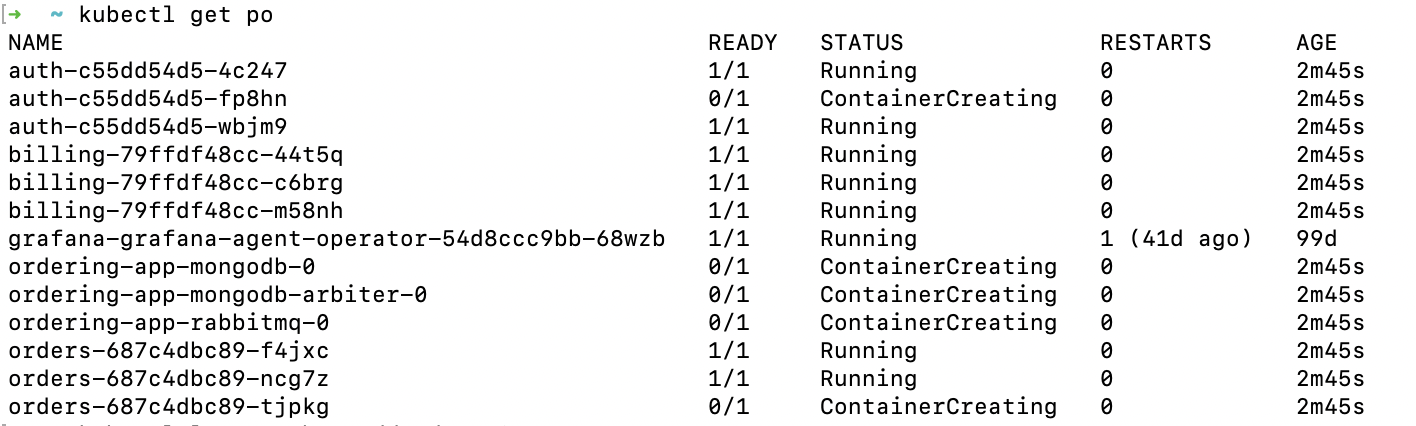
See all the pods
$ kubectl get po
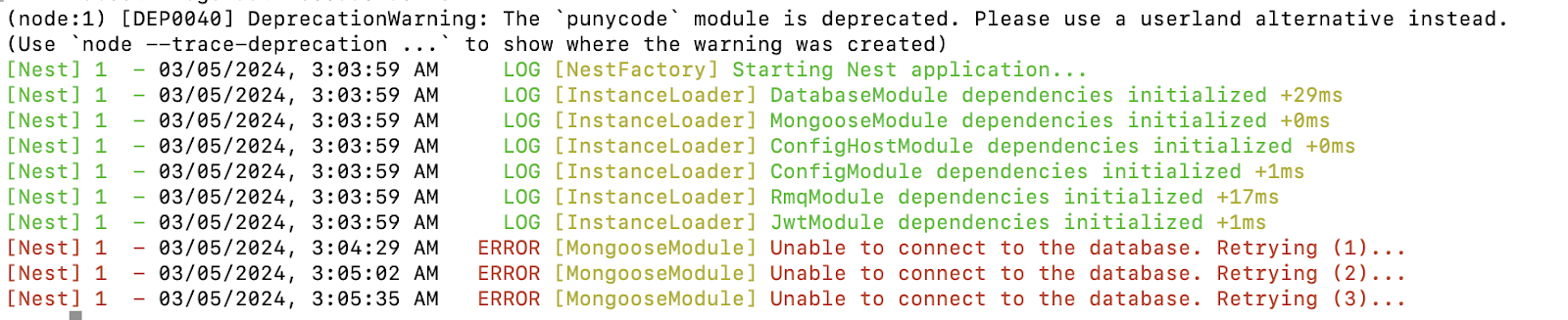
Check logs
$ kubectl logs
3. Key Note
#I. Config EKS AWS for K8S local
## Check Kubectl version
```
kubectl version --client
```
## Add Cluster EKS AWS to k8s local
```
aws eks --region <region> update-c --name <cluster-name>
```
## Verification
```
kubectl config get-contexts
```
## Switch to use the context for EKS AWS; even though if you have a problem with kubectl get pods, or some thing like that, you also use this command.
```
kubectl config use-context <context-name>
```
## If you want to remove configuration EKS Cluster, Context AWS in your k8s
### The first: remove config
```
kubectl config show
kubectl config delete-cluster <cluster-name>
```
### The second: remove context
```
kubectl config get-contexts
kubectl config delete-context <context-name>
```
## Note
## Check Kubectl version
```
kubectl version --client
```
## Add Cluster EKS AWS to k8s local
```
aws eks --region <region> update-c --name <cluster-name>
```
## Verification
```
kubectl config get-contexts
```
## Switch to use the context for EKS AWS; even though if you have a problem with kubectl get pods, or some thing like that, you also use this command.
```
kubectl config use-context <context-name>
```
## If you want to remove configuration EKS Cluster, Context AWS in your k8s
### The first: remove config
```
kubectl config show
kubectl config delete-cluster <cluster-name>
```
### The second: remove context
```
kubectl config get-contexts
kubectl config delete-context <context-name>
```
## Note
### Set configuration
```
aws eks --region <region-code> update-kubeconfig --name <cluster-name>
```
### Some commands for tracking when having issue#### Check Node Resources
```
kubectl describe nodes
```
#### Monitoring
```
kubectl get pods --all-namespaces
kubectl describe pod ordering-app-rabbitmq-0
kubectl get po
kubectl logs kubectl logs auth-c55dd54d5-4c247
```
```
# Get deployment
kubectl get deployment
```
```
# Get replicaset
kubectl get replicaset
```
####
# II. Build Dockerfile
## Build images
```
cd apps/ordering
docker build ../../ -f Dockerfile -t loinv4/ordering-app_order
```
### Push image
```
docker image push loinv4/ordering-app_order
```
# III. Install Helm
## Deploy
```bash
cd helm/ordering-app
helm install ordering-app .
```
## Update Helm dependency to install the dependencies such as RabbitMQ, Redis,..
```
helm dependency update
```
## Update Helm dependency
```
helm upgrade ordering-app .
```
# II. Build Dockerfile
## Build images
```
cd apps/ordering
docker build ../../ -f Dockerfile -t loinv4/ordering-app_order
```
### Push image
```
docker image push loinv4/ordering-app_order
```
# III. Install Helm
## Deploy
```bash
cd helm/ordering-app
helm install ordering-app .
```
## Update Helm dependency to install the dependencies such as RabbitMQ, Redis,..
```
helm dependency update
```
## Update Helm dependency
```
helm upgrade ordering-app .
```
3. Kind of K8S
Pod: The smallest deployable unit in Kubernetes, representing a single instance of a running process in the cluster.
Deployment: A resource used to define a desired state for a deployment of pods. It provides declarative updates to applications, such as rolling updates and scaling.
StatefulSet: Manages the deployment and scaling of a set of pods, and provides guarantees about the ordering and uniqueness of these pods.
Service: Defines a logical set of pods and a policy by which to access them, typically providing a stable endpoint for communication.
ReplicaSet: Ensures that a specified number of pod replicas are running at any given time, providing high availability for your application.
Ingress: Manages external access to services in a cluster, typically HTTP(S) routes.
ConfigMap: Stores configuration data as key-value pairs, which can be used by other resources in the cluster.
Secret: Stores sensitive data, such as passwords or API keys, and makes it available to pods securely.
Namespace: Provides a scope for names, allowing to partition resources into logically named groups.
Job: Runs a specific task to completion, such as a batch job or one-off tasks.
CronJob: Runs a job on a schedule, similar to cron in Unix-like operating systems.
PersistentVolume / PersistentVolumeClaim: Provides a way for users to request durable storage resources and have them provisioned by an administrator.
ServiceAccount: Provides an identity for processes that run in a pod, allowing control over the permissions those processes have in the cluster.
Namespace: Provides a way to logically divide cluster resources between multiple users, teams, or projects.
DaemonSet: Ensures that all (or some) nodes run a copy of a pod, typically used for system daemons or log collectors.
3. Install K8S at your local
Require: Docker
Install kubectl
Install Kind
Create Cluster using Kind
Done
Subscribe to:
Posts (Atom)
-
What is Helm? 1. Install Helm: If you haven't already installed Helm on your local machine and your Kubernetes cluster, you can foll...
-
1. Bánh dẻo * Nước đường: 60gram * Bột: 33 gram * Nhân: 50 gram - Nước đường: + 250 gr đường + 250 gr nước nóng + 1 tý cream or tear - Nhân...
-
Part 1: Define Your Data Structure 1.1 How to Organize Documents Documents need to be broken into small, retrievable chunks. Each chunk sh...
