學行須識世與身
知人知己理分真
習學乃明邦與國
疆陲何處辨山津
(Học hành tu thức thế dữ thân
Tri nhân tri kỷ lý phân chân
Tập học nãi minh bang dữ quốc
Cương thùy hà xứ biện sơn tân)
Học đi cho biết
 學行須識世與身
知人知己理分真
習學乃明邦與國
疆陲何處辨山津
(Học hành tu thức thế dữ thân
Tri nhân tri kỷ lý phân chân
Tập học nãi minh bang dữ quốc
Cương thùy hà xứ biện sơn tân)
學行須識世與身
知人知己理分真
習學乃明邦與國
疆陲何處辨山津
(Học hành tu thức thế dữ thân
Tri nhân tri kỷ lý phân chân
Tập học nãi minh bang dữ quốc
Cương thùy hà xứ biện sơn tân)
Deploy EKS with hem
1. Require
Install EKS
To install or upgrade eksctl on macOS using Homebrew
Install the Weaveworks Homebrew tap.
brew tap weaveworks/tapInstall or upgrade eksctl.
Install
eksctlwith the following command.brew install weaveworks/tap/eksctlIf
eksctlis already installed, run the following command to upgrade.brew upgrade eksctl & brew link --overwrite eksctl
Test that your installation was successful with the following command. You must have
eksctl0.34.0 version or later.eksctl version
To install or upgrade
eksctl on Linux using curlDownload and extract the latest release of eksctl with the following command.
curl --silent --location "https://github.com/weaveworks/eksctl/releases/latest/download/eksctl_$(uname -s)_amd64.tar.gz" | tar xz -C /tmpMove the extracted binary to /usr/local/bin.
sudo mv /tmp/eksctl /usr/local/binTest that your installation was successful with the following command. You must have
eksctl0.34.0 version or later.eksctl version
Create an Amazon EKS cluster using
eksctlCreate cluster
eksctl create cluster -n ordering-app --region ap-southeast-1 --profile zig
Create cluster
eksctl create cluster -n ordering-app --region ap-southeast-1 --profile zig
2. Todo
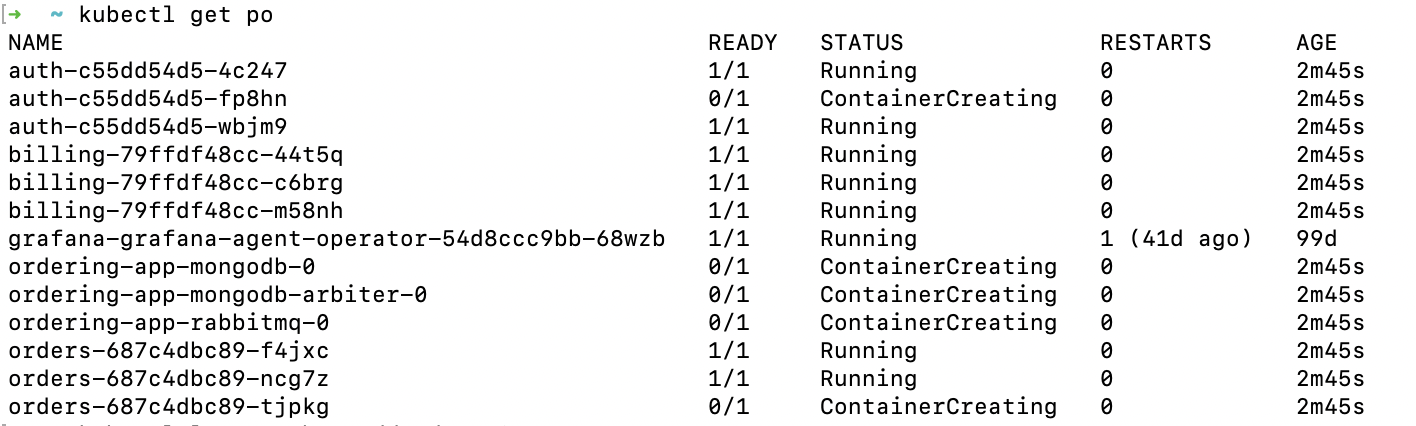
See all the pods
$ kubectl get po
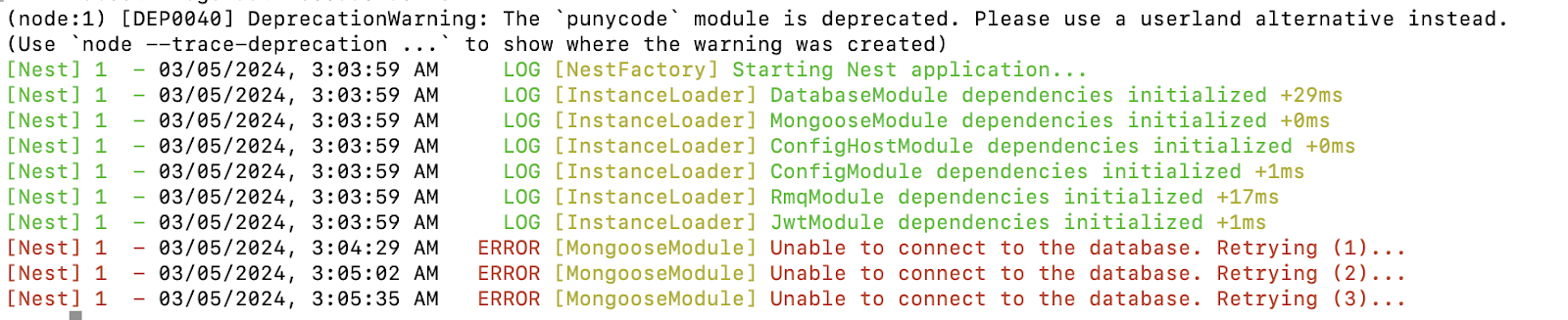
Check logs
$ kubectl logs
3. Key Note
#I. Config EKS AWS for K8S local
## Check Kubectl version
```
kubectl version --client
```
## Add Cluster EKS AWS to k8s local
```
aws eks --region <region> update-c --name <cluster-name>
```
## Verification
```
kubectl config get-contexts
```
## Switch to use the context for EKS AWS; even though if you have a problem with kubectl get pods, or some thing like that, you also use this command.
```
kubectl config use-context <context-name>
```
## If you want to remove configuration EKS Cluster, Context AWS in your k8s
### The first: remove config
```
kubectl config show
kubectl config delete-cluster <cluster-name>
```
### The second: remove context
```
kubectl config get-contexts
kubectl config delete-context <context-name>
```
## Note
## Check Kubectl version
```
kubectl version --client
```
## Add Cluster EKS AWS to k8s local
```
aws eks --region <region> update-c --name <cluster-name>
```
## Verification
```
kubectl config get-contexts
```
## Switch to use the context for EKS AWS; even though if you have a problem with kubectl get pods, or some thing like that, you also use this command.
```
kubectl config use-context <context-name>
```
## If you want to remove configuration EKS Cluster, Context AWS in your k8s
### The first: remove config
```
kubectl config show
kubectl config delete-cluster <cluster-name>
```
### The second: remove context
```
kubectl config get-contexts
kubectl config delete-context <context-name>
```
## Note
### Set configuration
```
aws eks --region <region-code> update-kubeconfig --name <cluster-name>
```
### Some commands for tracking when having issue#### Check Node Resources
```
kubectl describe nodes
```
#### Monitoring
```
kubectl get pods --all-namespaces
kubectl describe pod ordering-app-rabbitmq-0
kubectl get po
kubectl logs kubectl logs auth-c55dd54d5-4c247
```
```
# Get deployment
kubectl get deployment
```
```
# Get replicaset
kubectl get replicaset
```
####
# II. Build Dockerfile
## Build images
```
cd apps/ordering
docker build ../../ -f Dockerfile -t loinv4/ordering-app_order
```
### Push image
```
docker image push loinv4/ordering-app_order
```
# III. Install Helm
## Deploy
```bash
cd helm/ordering-app
helm install ordering-app .
```
## Update Helm dependency to install the dependencies such as RabbitMQ, Redis,..
```
helm dependency update
```
## Update Helm dependency
```
helm upgrade ordering-app .
```
# II. Build Dockerfile
## Build images
```
cd apps/ordering
docker build ../../ -f Dockerfile -t loinv4/ordering-app_order
```
### Push image
```
docker image push loinv4/ordering-app_order
```
# III. Install Helm
## Deploy
```bash
cd helm/ordering-app
helm install ordering-app .
```
## Update Helm dependency to install the dependencies such as RabbitMQ, Redis,..
```
helm dependency update
```
## Update Helm dependency
```
helm upgrade ordering-app .
```
3. Kind of K8S
Pod: The smallest deployable unit in Kubernetes, representing a single instance of a running process in the cluster.
Deployment: A resource used to define a desired state for a deployment of pods. It provides declarative updates to applications, such as rolling updates and scaling.
StatefulSet: Manages the deployment and scaling of a set of pods, and provides guarantees about the ordering and uniqueness of these pods.
Service: Defines a logical set of pods and a policy by which to access them, typically providing a stable endpoint for communication.
ReplicaSet: Ensures that a specified number of pod replicas are running at any given time, providing high availability for your application.
Ingress: Manages external access to services in a cluster, typically HTTP(S) routes.
ConfigMap: Stores configuration data as key-value pairs, which can be used by other resources in the cluster.
Secret: Stores sensitive data, such as passwords or API keys, and makes it available to pods securely.
Namespace: Provides a scope for names, allowing to partition resources into logically named groups.
Job: Runs a specific task to completion, such as a batch job or one-off tasks.
CronJob: Runs a job on a schedule, similar to cron in Unix-like operating systems.
PersistentVolume / PersistentVolumeClaim: Provides a way for users to request durable storage resources and have them provisioned by an administrator.
ServiceAccount: Provides an identity for processes that run in a pod, allowing control over the permissions those processes have in the cluster.
Namespace: Provides a way to logically divide cluster resources between multiple users, teams, or projects.
DaemonSet: Ensures that all (or some) nodes run a copy of a pod, typically used for system daemons or log collectors.
3. Install K8S at your local
Require: Docker
Install kubectl
Install Kind
Create Cluster using Kind
Done
Subscribe to:
Comments (Atom)
-
Introduction The life cycle of (HRM)/payroll is a recurring set of business activities and related data processing operations associated w...
